


Introduction
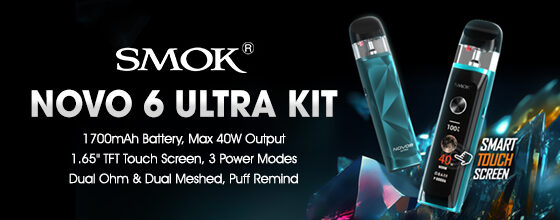
The NOVO 6 ULTRA blends intelligent design with powerful performance. Its reinforced leak-resistant construction and arc-shaped mouthpiece ensure an authentic and pure flavor. Equipped with a 1700mAh fast-charging battery, smart puff reminding, and a timeless aesthetic, the future of vaping is truly in your hand. Innovation keeps changing the vaping experience.
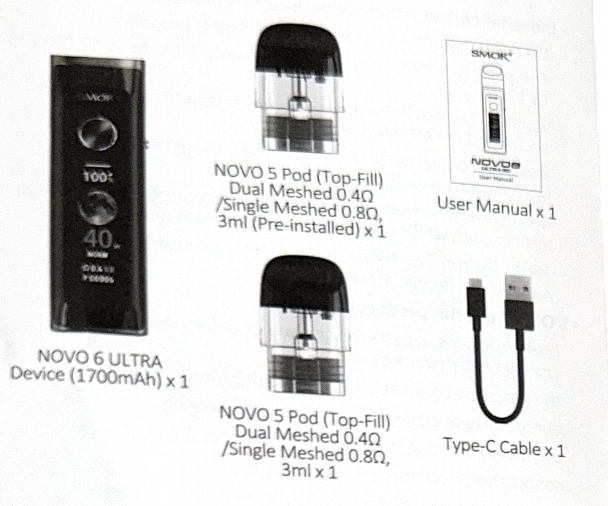
The Kit Includes
Specifications
Size: 122*28.3*18.8mm
Weight: 83.95g
Battery Capacity: 1700mAh
Power Range: 5W- 40W±2W
Resistance Range: 0.45Ω-2.5Ω±0.1Ω
Charging Voltage: 5.0V±0.2V
Charging Current: 2.0A±12%
Overcharge Voltage: 4.425V±0.05V
Overdischarge Voltage: 2.8V±0.1V
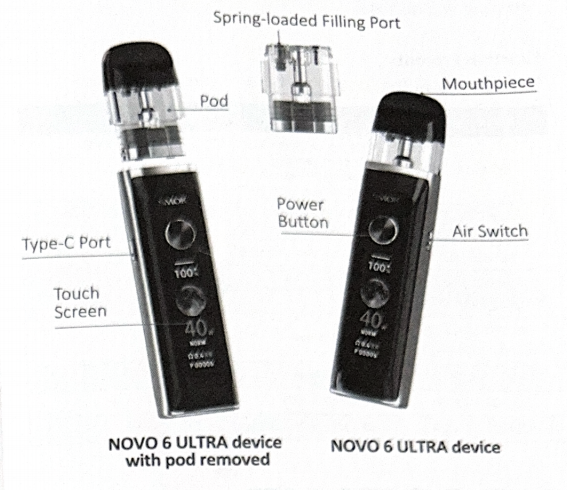
Your NOVO 6 ULTRA Device
Charing
The NOVO 6 ULTRA device is charged using the Type-C cable provided. When the type-c cable is inserted, the dynamic charging interface will be
displayed with the battery percentage and the remaining charging time.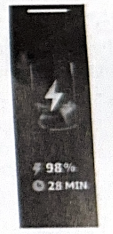
Important information about charging
- The product should be charged between 10°C to 45°C/ 50°F to 113°F.
- Do not charge this product outdoors or in a hot, cold, damp environment or in direct sunlight as short circuit may occur.
- Unplug the type-c cable within 2 hours of the battery being fully charged to extend the life of the battery. Do not overcharge the batteries.
- Only use the original type-c cable provided and UL-Listed
charging sources. - Do not use this product if abnormal heat is generated during
charging. - Do not use any power source without legal manufacturing
licenses. - Do not charge this product near:
Any source of heat, such as a fire,hot stove or a radiator.
Combustible or explosive materials or gas.
Opening and Closing instruction for Filling and Refilling E-Liquid
- Pull the pod out of the device.
- Push the new pod into the device.


Prime the coil
Before inserting the pod into the device, inhale on the mouthpiece 2-3 times to draw e-liquid into the coil. Priming the coil before use optimizes the vaping experience and avoids burning the coil.
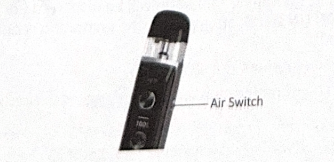
How to control air input
Toggle the air switch to control the amount of air intake.
Using your NOVO 6 ULTRA Device
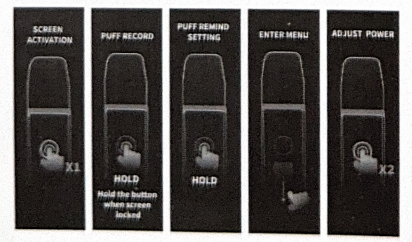
- Power on
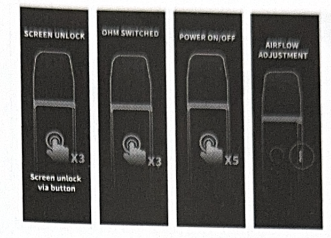
While the device is off, quickly press the Power Button 5 times to turn it on. The interface will display SMOK and the product model, and then enters the main interface. - Check the mouthpiece is clean
Before vaping check that the mouthpiece is clean.
Do not inhale if the mouthpiece is dirty or contains foreign objects. - Unlock/lock the touchscreen
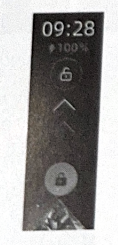
When the touchscreen is locked, the touch-to-unlock interface appears. If no action is taken within 5 seconds, the device turns off the display and enters standby mode.
Swipe up or press the power button 3 times in succession to unlock the touchscreen. - Set the function menu
When the touchscreen is unlocked, press and hold the power button or swipe down to enter the function menu interface.
Swipe up and down to select the function to be set.
Click ‘EXIT’ or swipe right to exit the function menu interface.
(1) ADJUST POWER: Adjust the wattage
When the touchscreen is unlocked, quickly press the power button 2 times or swipe down to enter the function menu interface.
Click or long press the power button or swipe up and down to select the wattage to be adjusted.
Note: Wattage adjustment cannot be performed cyclically.
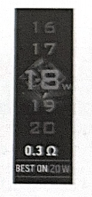
The wattage adjustment interface displays the current resistance and its best power.
Click the customized wattage or press the power button to confirm the selection.
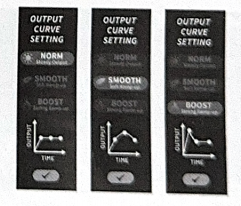
(2) OUTPUT CURVE: Select the output mode:
NORM/SMOOTH/BOOST
Click to select the output mode and click √ or press the power button to confirm the selection.
(3) OHM SELECT: Select single ohm or dual ohm
When the touchscreen is unlocked, quickly press the power button 3 times to select single ohm or dual ohm.
When inserting a pod,the device automatically identifies its type and display its resistance and power range.
1. Single-ohm pod, there is only SINGLE OHM.
2. Dual-ohm pod, there are two choices of resistance, SIGNLE MESH and DUAL MESH.

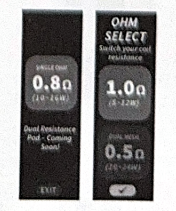
Click “EXIT” (Single-ohm pod) or √ (Dual-ohm pod)or press the power button to confirm the selection.
(4) THEME: Select a theme from THE MOON/KALEIDO-SCOPE/MELODY/MINIMALISM
Swipe up and down to select a theme from 4 choices. Click the center screen to confirm the selection and return to the main interface.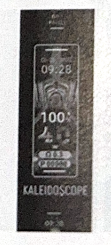
(5)LOCK WALLPAPER: Select a wallpaper from VOID CRATER/NIOR DIAMOND/GEAR VOID/THE FLASH/DIAMOND/MELODY
Swipe up and down to select a wallpaper from 6 choices.
Click the center screen to confirm the selection and return to the main interface.
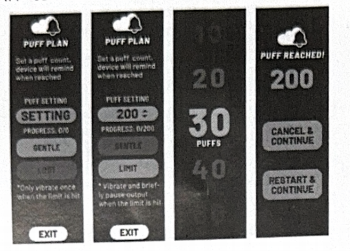
(6) PUFF REMIND: Set the puff limit and reminder type
1. SETTING: Click to enter the puff limit setting interface.
Swipe up and down to select a pufflimit to be set. Click to confirm the selection and return to the main interface.
2. Click ‘GENTLE’or ‘LIMIT’ to select the reminder type.
GENTLE: Vibrates twice when preset puff limit is reached. No Pop-up reminder and norestriction on output. Cycles until the puff limit is canceled.
LIMIT: Vibrates once when preset puff limit is reached. A Pop-up reminder appears showing ‘PUFF REACHED’ and the output is restricted. On ‘PUFF REACHED’, select to cancel the puff limit (CANCEL&CONTINUE) or continue to next cycle(RESTART&CONTINUE).
Click ‘EXIT’ to return to the function menu interface.
(7) PUFF RECORD: 7-day puff data recording
Check daily puffs in the last 7 days.
When the touchscreen is locked, press nad hold the power button to enter ‘PUFF RECORD’.
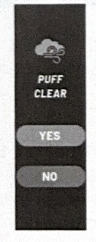
(8) PUFF CLEAR: Clear the total puffs
Click YES/NO to clear or remain the total puffs.
The total puffs will automatically recount from one when it reaches 9999p.
(9) GUIDE: operation instructions
Swipe up and down to scan the operation instructions.
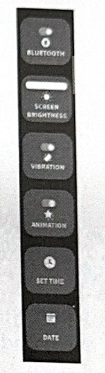
(10) SETTING: BATTERY SAVING/SMART REMIND/SCREEN BRIGHTNESS/ANIMATION/TIME/DATE
Swipe up and down to select the function to be set.
1. BATTERY SAVING: Set vaping with/without screen on/off.
2. SMART REMIND: Set greeting and wellness tips.
-GOOD MORNING: greeting at 7AM-9AM.
-GOOD NIGHT: greeting at 22PM-24PM.
-STAY HYDRATED: when vaping more than 100p in 10 minutes in succession.
3. SCREEN BRIGHTNESS: Adjust the screen brightness.
4. ANIMATION: Activate or cancel the animation while vaping or on the main interface.
5. TIME: Set time (12-hour system or 24-hour system).
6. DATE: Set date.
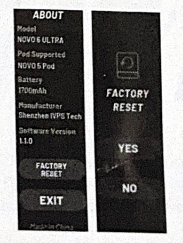
(11) ABOUT: Display the product information
FACTORY RESET: resume to default setting
5. Vaping
Start vaping by inhaling through the mouthpiece.
When vaping, the vaping animation will be displayed (in ANIMATION ON state); after vaping, the animation is delayed by 2 seconds.
(1) Do not vape for more than 8 seconds.
(2) A “TIME OVER” notification will occur if vaping exceeds 8 seconds.
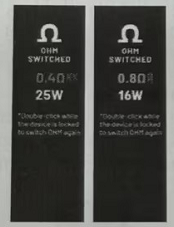
6. Set the OHM Switched
While the touchscreen is unlocked, quickly press the power button to switch ohm choices.
If the inserted pod is a dual-ohm pod, the output can be switched between single-ohm and dual-ohm.
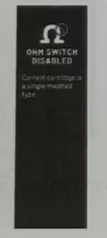
If the inserted pod is a single-ohm pod, the output cannot be switched and a prompt of ‘OHM SWITCH DISABLED’ appears on the screen.
7. Power off
To return the power off, quickly press the Power Button 5 times.
Disposal
Do not dispose of the vaping device, e-liquid or pods in the general waste, please follow local laws and regulations for recycling and disposal.
Function Prompts
The meaning of the function prompts is described below:
| Screen prompt | Details |
| LOW BATTERY | Battery voltage<3.5V±0.1V or battery level=0% (before vaping); Battery voltage<2.95V±0.1V (when vaping) (Please charge the device) |
| THE ATOMIZER IS SHORT CIRCUITED | Atomizer resistance of single pod < 0.45Ω±0.1Ω or short circuit detected |
| NO ATOMIZER | No atomizer detected |
| THE RESISTANCE OF THE ATOMIZER IS HIGH | Atomizer resistance> 2.5Ω±0.1Ω |
| PROTECTION FOR EXCESSIVE SMOKING TIME | Vaping times> 8s |
| POD ATTACHED | Pod is connected |
| POD DETACHED | Pod is removed |
| SCREEN UNLOCK | Touchscreen is unlocked |