

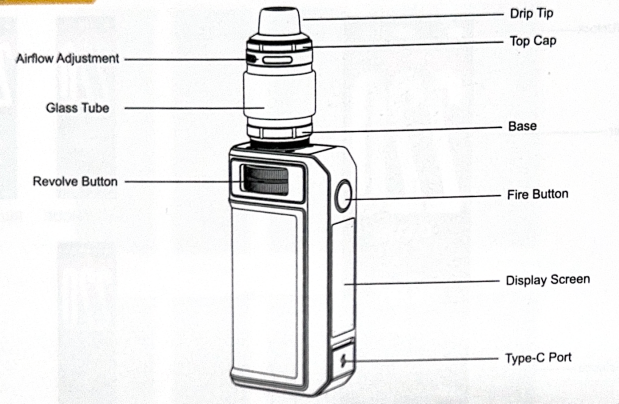
Parameters
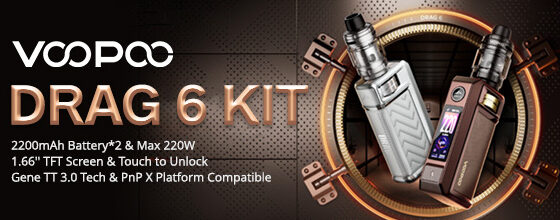
Size: 96.9*51.4*28.6 mm (MOD)
Battery Capacity: 4400 mAh (Built-in)
Max Output Voltage: 8.4 V
Power Range: 5-220 W
Charging Voltage: 5V/3A
Resistance Range: 0.05-3.0 Ω
E-liquid Capacity: 5 mL (Standard & US Version) / 2 mL (TPD Version)
Included Coils: PnP X 0.15 Ω + PnP X 0.3 Ω
Steps
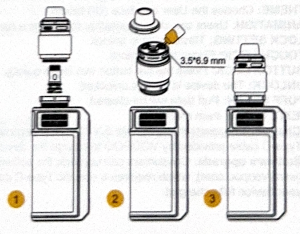
Step 1: Install the coil
Unscrew the base, then insert the coil from the bottom of the tank.
Step 2: Fill the atomizer with e-liquid
Remove the top cap, fill the e-liquid through the filling port. It is recommended to keep the tank about two-thirds full.
Step 3: Start to use the device
Allow the coil to become fully saturated ofr about fice minutes.
After that, you can adjust the airflow and power to enjoy an optimal vaping expenience.
Interface Introduction
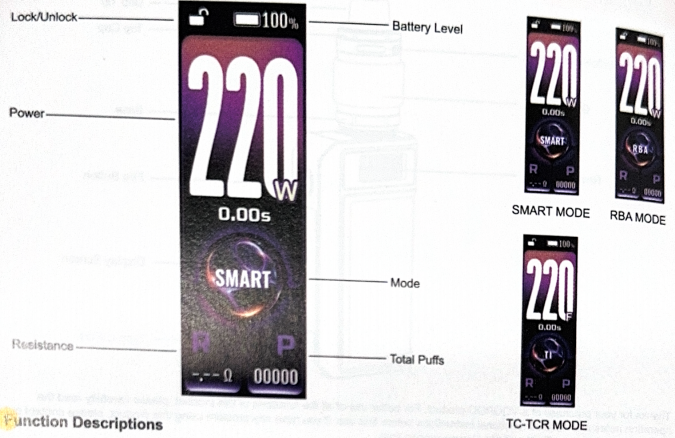
Function Descriptions
- ON/OFF: Press the fire button five times quicky.
- LOCK/UNLOCK: Smart touch unlock. Enter the menu and select the unlock method.
- Power adjusment: Use the toggle switch to adjust the power. Turn the knob clockwise to increase the power and counterclockwise to decrease the power.
- MENU: Press the fire button three times quickly to enter the menu.
- Mode: After entering the setting interface, select the ‘Mode’ option, then choose the mode of the device on the sub-interface.
SMART: This mode can identify the best power and prevent the coil from burning due to excessive power during use.
RBA: User-customizable power adjustment from 5 W to 220 W.
TC-TCR:
A) This mode supports four kind of heating wie: Ni200, Titanium(Ti), SS316, and SS430.
B) TC adjustable range: 200-600 ℉ / 100-315 ℃
C) In TC mode, press the fire button twice consecutively to switch between ℃and ℉.
D) Recommended resistance value range for TC mode: 0.05 Ω – 3.0 Ω. - THEME: Choose the User Interface(UI) theme.
- ANIMATION: Users can choose whether they want a flame vaping animation.
- LOCK SETTING: Three ways to unlock.
TOUCH LOCK: Finger touch unlock.
BUTTON LOCK: Press the fire button two times quickly.
UNLOCK: The device is always unlocked. - PUFF CLEAN: Puff data will be cleared.
- EXIT: Exit the main menu.
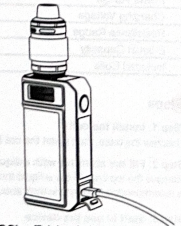
- Charging: Supports charging with 5V/3A. It is recommend to use the Type-C cable provided by VOOPOO to charge the device.
- Soltware upgrade: Consumers can upgrade the software to the latest version via VOOPOO’soffcal website, which requires a specific Type-C cable to connect the VOOPOO product to the computer. Please keep your device fully charged.
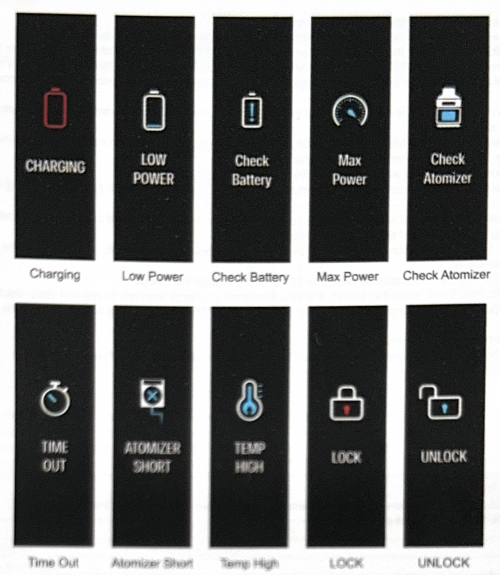
- Status Notification
Safely Protection
Overtime Protection
Short-Circuit Protection
Low Battery Protection
Over Charge Protection
Overheating Protection
Output Over-Current Protection